Loading…
Fetching your data…
SelfRunBusiness
Securing your session…
Fetching your data…
FAQs
About Approval rules and SelfRun CashFlow AI.
Your role may not include it. Ask your workspace owner to open Workspace → Users and give your role access to SelfRun CashFlow AI.
Yes. SelfRun AI works in the browser on any device and can be installed as an app on Android, iOS and desktop, with the same screens and the same data.
No. Approval rules comes with the SelfRun CashFlow AI product, and every product is included in every plan.
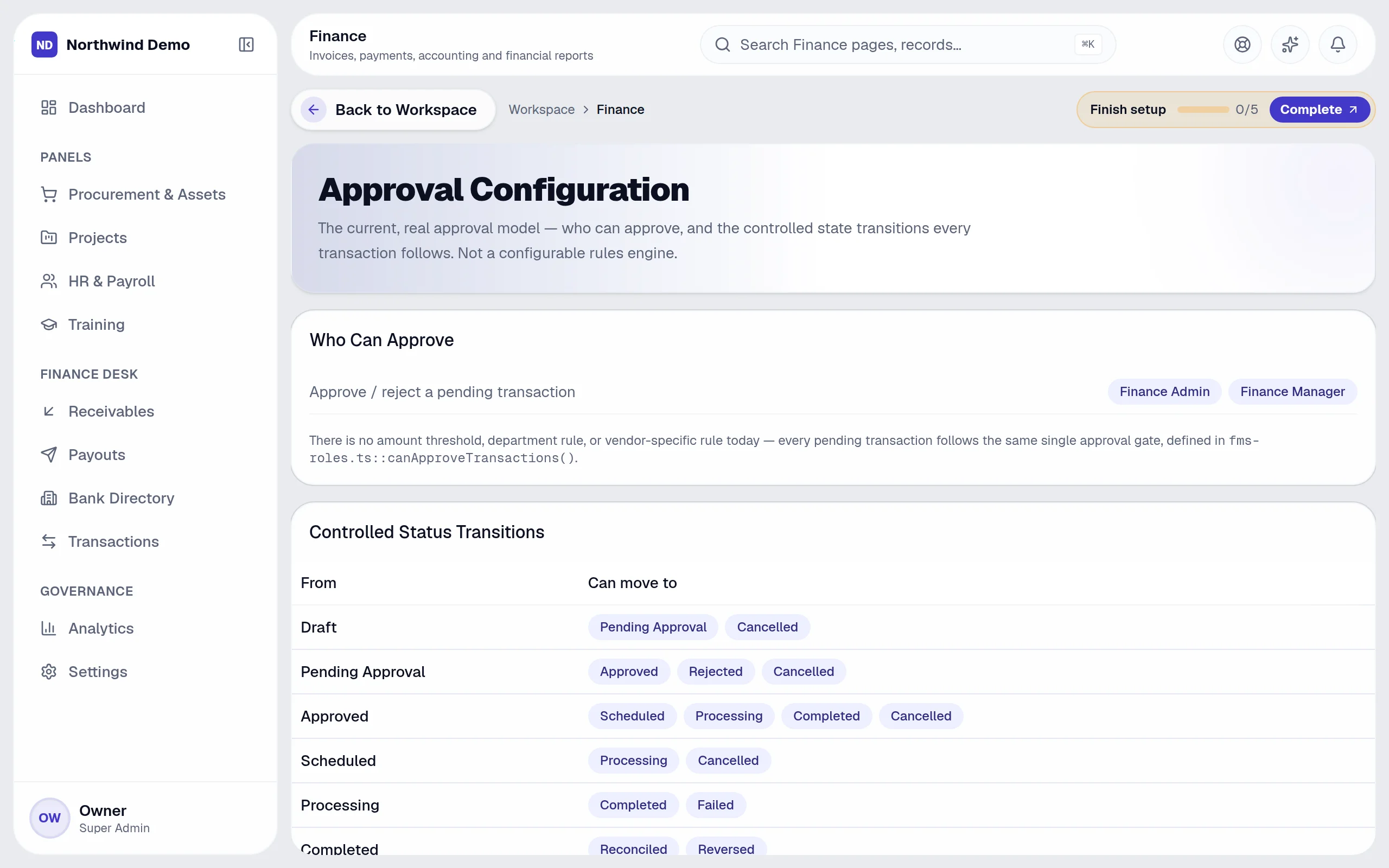
Approval rules is part of SelfRun CashFlow AI. Thresholds and approvers. This guide takes you through it in 4 short steps.
Where it fits in your work — Reconcile & report. Match bank and cash, then read profit & loss, balance sheet, cash flow and tax reports.
Step 1
Open SelfRun CashFlow AI
Sign in and open the SelfRun CashFlow AI product from your Workspace dashboard (or sign in to it directly). You see only what your role allows.
Step 2
Open “Approval Configuration”
In the left menu of SelfRun CashFlow AI, open the page called “Approval Configuration” (some pages sit inside a menu group — click the group to expand it).
Step 3
Read the list
Each row shows:
Step 4
Done
Thresholds and approvers.
Open SelfRun CashFlow AI → Open “Approval Configuration” → Read the list → Done
SelfRun DealFlow AI
Won clients become customers you can invoice.
SelfRun SprintOS
Milestones raise invoices; project costs feed profitability.
SelfRun TalentOS
Payroll runs and salary payments arrive from HR.
SelfRun SpendIQ
Matched vendor invoices become payables.
SelfRun Cohort AI
Student fees and receipts.
These are the parts of the Approval Configuration screen, exactly as they appear in the product.
Columns in the list
SelfRun CashFlow AI replaces accounting & invoicing software and runs independently with its own sign-in and database.
Finance managers
Approve payouts, watch cash flow and close periods.
Accountants
Post, reconcile and report from the ledger.
Collections & receivables
Send invoices and payment links and chase what is overdue.
Auditors
Read-only access to reports and the audit trail.
Approvals
Route money movements for sign-off
Chart of accounts
Your own account structure
Fiscal periods
Open and close periods
Numbering
Document number series
Tax configuration
GST and tax rates
Exchange rates
Multi-currency support
Payment methods
Accepted ways to pay
Asset expenses
Link spending to company assets
SelfRun AI is a cloud platform that brings your sales, HR, finance, projects, procurement, training, documents, website and team communication into one system, with AI and workflow automation running through all of it.
No. Each plan includes a set of modules and you switch on only what you need during setup. You can turn modules on or off later from your workspace settings.
Yes. The Free plan is free forever and includes every product and every feature — no card needed. Paid plans add more people and bigger storage, AI, email and voice allowances.